Products: options, prices, sale prices, stock, images, categories, tags
Customers: name, email, phone
Blog posts, with their links
Moves with one step
Your domain
Old product links, sent to the new pages
Stays behind
Customer passwords: customers sign in by email code
Reviews, and pictures set per variant: Squarespace’s export leaves them out
Past orders: they stay in Squarespace
Your template and extensions
Keep your Squarespace site online until the move is done. Helm copies your product images from it, because the export holds image links, not the images.
Part 1Get your things out of Squarespace
1
In Squarespace
Export your products
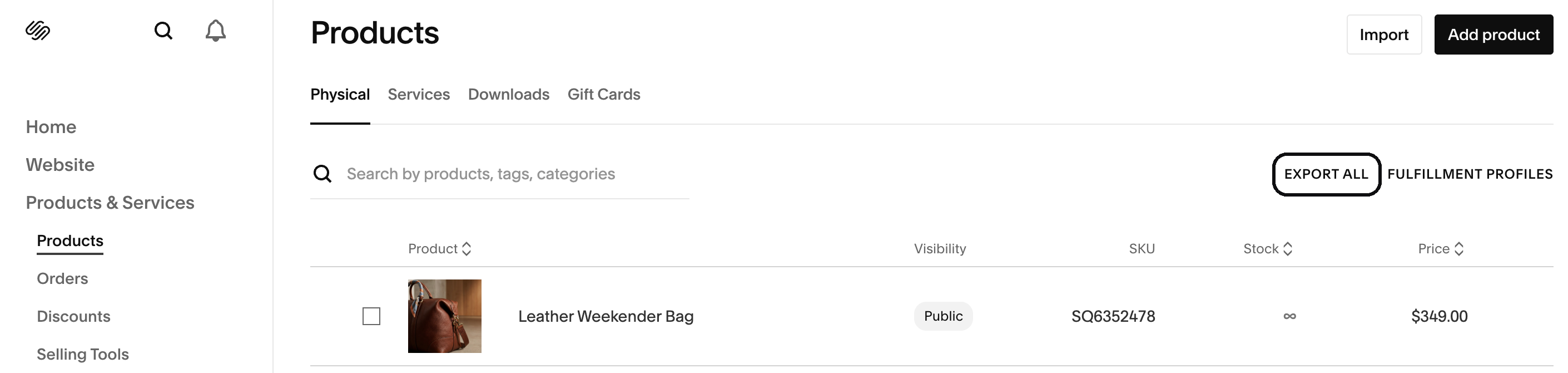
In Squarespace, open Products & Services → Products.
Press Export all. The file downloads to your computer.
Products → Export all · 13 Nov 2026 · Squarespace 7.1
You’ll haveA CSV file with every physical and service product, its options, prices, stock and image links.
2
In Squarespace
Export your contacts
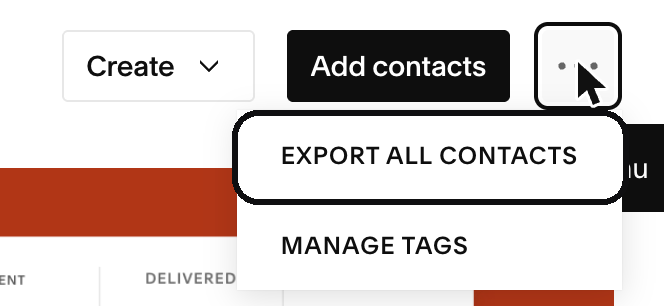
Open Contacts.
Press ⋯ at the top right, then Export all contacts.
Contacts → ⋯ → Export all contacts · 13 Nov 2026 · Squarespace 7.1
Drop the products file. Helm shows what it found: products, variants, images, and any line it couldn’t read.
Check the list, then bring them in.
Example · Shop → Products → Import
Shop · Import productsproducts.csvSquarespace
18products42variants61images
Linen shirt3 sizes · 2 colours$34.00New
Olive oil soapNo options$6.50New
Gift box2 sizes$22.00New
Line 14No price, so it comes in as a draftCheck
Not brought inDiscount codes, gift card balances
Bring in 18 productsUndo for 7 days
You’ll haveYour products in your shop, their images copied into Helm, and each old product address saved for later.
Good to knowChanged your mind? Undo takes the import back for 7 days, and keeps any product you’ve edited since.
4
In Helm
Bring in your customers
Open Customers and press Import.
Upload the customers file.
Match columns: the email column goes into Email.
Check, then bring them in.
Example
Bring in your customers
1Upload2Match columns3Check
Your columnGoes into
Email→Email
First Name→Name
Phone→Phone
Accepts Email Marketing→Leave out
People who already exist are matched by email and updated. Nothing is deleted.
Continue
Good to knowNobody gets an email, and nobody is signed up to anything.
5
In Helm
Bring in your blog
In Helm, open Blog and press Import.
Under Or from a blog’s address, paste your blog’s address, such as yourbusiness.com/blog.
Leave Keep their addresses on, so each post keeps its link.
Example
Blog · Import
Or from a blog's address
yourbusiness.com/blog
Keep their addressesOld links lead to the same posts
12 posts foundNothing goes live unless you choose it
Good to knowSquarespace can also save your blog as a WordPress file: Settings → Website → Import & Export Content → Export → WordPress. Helm’s blog import reads WordPress files, so you can drop that file instead. A trial site can’t export.
In Helm, open Settings → Domain & site and press Add domain.
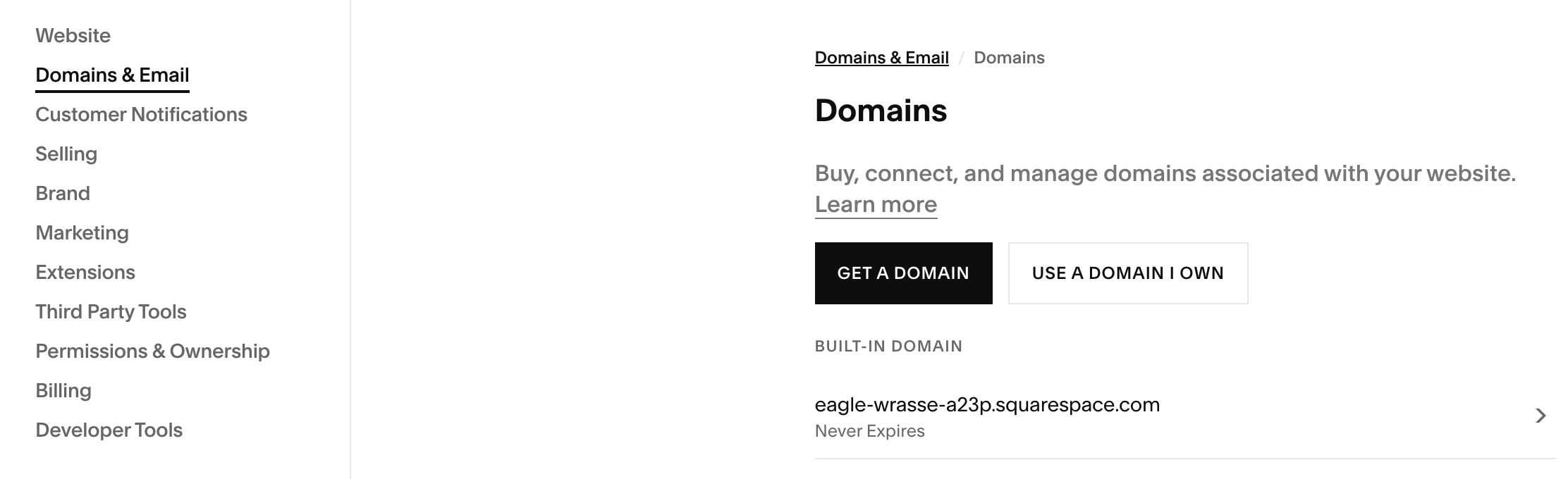
Helm shows the records to set. Set them where your domain is managed: in Squarespace under Settings → Domains & Email → Domains if you bought it there, or at the company you bought it from.
Helm checks them and tells you when your domain is on Helm.
Good to knowBought your domain through Squarespace? You can also transfer it away: open it under Domains, turn off its domain lock, and ask for the transfer code. Your .squarespace.com address stays with Squarespace.
7
Google
Keep your place on Google
Nothing to do for links: each old product address now sends people, and Google, to its new page, and posts kept theirs.
In Helm, open SEO and press Connect under Connect Google Search Console, so Google reads your new site’s map.
You’ll haveYour product titles and search descriptions came with the import, so your pages read as they did.
Put your new site in your Instagram bio and WhatsApp profile.
Email only the people who agreed to hear from you.
Once your domain is on Helm and your products look right, cancel your Squarespace plan. Keep your export files.
What changes for your buyers: they pay by Whish, OMT or cash on delivery, or by card through your own gateway: Areeba or HyperPay in Lebanon, PayTabs or HyperPay in the Gulf, or ask for yours. Order emails, invoices and packing slips go out in English or Arabic.
Or let us do it
Rather we did it? We’ll move you.
Send your store’s address and what to move. Our team moves your products, customers, blog and domain by hand.
Free with a Helm trial or plan
We reply to your request within one business day
Questions
Will my old links still work?
Yes, once your domain points to Helm: each imported product’s old address sends people to its new page, and imported posts keep their addresses.
Do my customers need new passwords?
Passwords can’t be moved out of Squarespace. Your customers sign in to Helm with a code sent by email, or set a new password.
Can I keep selling on Instagram?
Yes. Helm’s Shop makes a product feed for Meta (Instagram and Facebook shopping), in English or Arabic.
Can I take my data with me later?
Yes. Products, orders and customers export as CSV files.